You do not need a rented server to trade while you are asleep or at work. A desktop PC can wake itself before the open, log in, launch everything, trade the session, close its positions, and shut down again — and it costs nothing beyond the electricity.
This guide sets that up end to end. It is the counterpart to running on a rented Windows VPS: same software, same broker connection, but the machine lives in your house and turns itself off when the market closes.
One thing up front, because it decides whether this is worth your time: how far you can automate depends on your broker, not on us. With moomoo or Alpaca the whole day runs untouched out of the box. With Interactive Brokers it takes one extra piece of open-source software, after which you log in once a week rather than once a day. Section 7 covers all of it.
1. What the day looks like
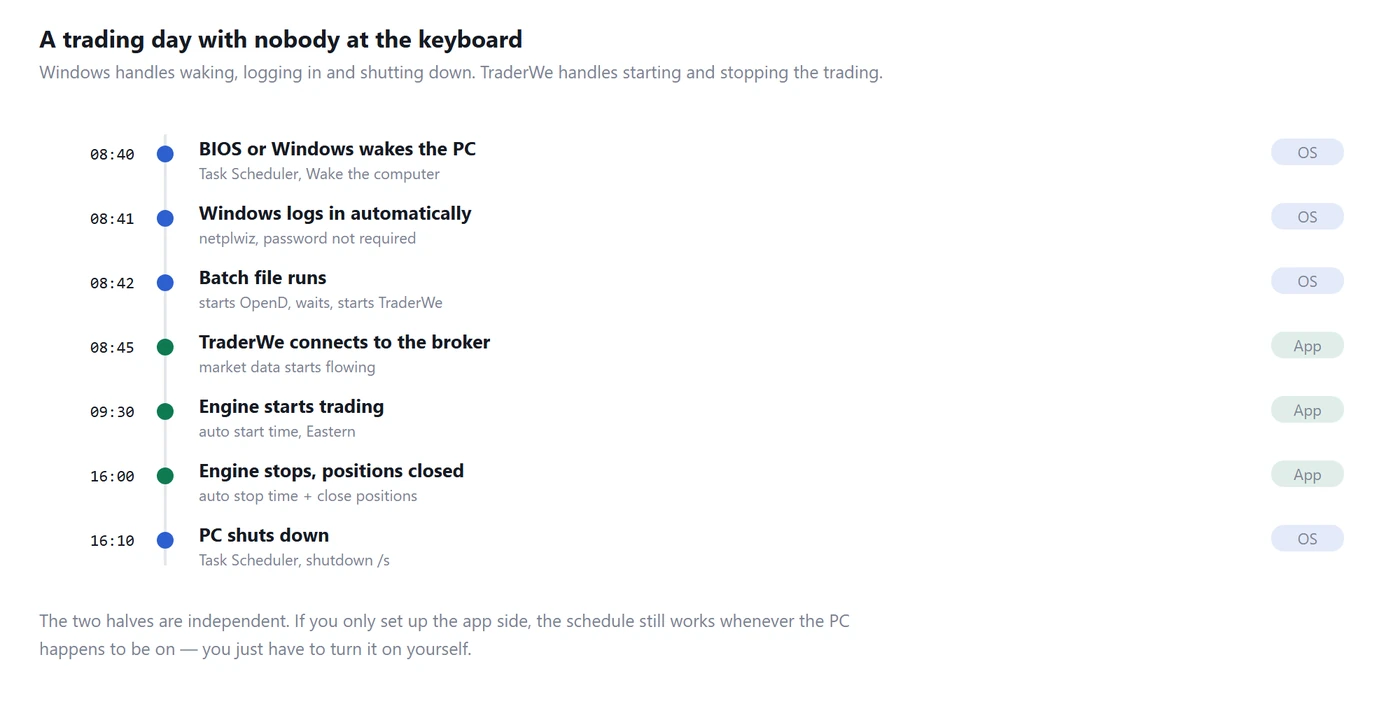
Timeline of a fully automated trading day, from wake at 08:40 to shutdown at 16:10
The work splits cleanly in two, and it helps to keep them separate in your head.
Windows handles the machine. Waking up, logging in, launching programs, shutting down. This is Task Scheduler and a batch file.
TraderWe handles the trading. When to start the engine, when to stop it, whether to close positions on the way out. These are settings inside the app, and they run on Eastern time regardless of your own time zone.
You can set up either half on its own. The app schedule works whenever the PC happens to be on, so if you only do section 3 you already have most of the value.
2. The app side: start and stop times
Open Settings and find the automatic operation section. Three things matter.
Automatic start with a start time, 09:30 by default. When the app is running and the clock passes that time, the engine starts trading by itself.
Stop time, 16:30 by default. The engine stops at that time. This one is not optional. There is no toggle to switch it off, because a day trading engine that never stops is not a design we want to ship.
Close positions before stopping, on by default. At the stop time the engine liquidates what it holds rather than leaving positions to sit overnight.
A few details worth knowing, because they explain behaviour that would otherwise look like a bug.
The times are Eastern, always. Recording it in Korea or Europe makes no difference, and this is deliberate: the trading day is the trading day.
Automatic start fires once per trading day, and only inside the window between your start and stop times. If your PC boots at 11:00 with a 09:30 start time, the engine still starts, because 11:00 is inside the window. If it boots at 17:00 with a 16:30 stop time, it does not, the day is over.
If the start fails because the broker is not connected yet, the app retries every 20 seconds and gives up after three consecutive failures, logging why. This matters for the batch file in the next section: you do not have to get the launch order perfectly timed, because the app will keep trying for about a minute.
3. The batch file
One file that launches the gateway, waits, then launches the app. Save it as start-trading.bat somewhere sensible such as C:\trading\.
@echo off
rem  moomoo OpenD first — the app connects to it on 127.0.0.1:11111
start "" "C:\OpenD\OpenD.exe"

rem  give the gateway time to come up and log in
timeout /t 90 /nobreak

rem  then TraderWe
start "" "%LOCALAPPDATA%\TraderWe\current\TraderWe.Host.exe"
Three notes on this.
Check your install path. The line above is where the installer puts it. If yours differs, right-click the Start-menu shortcut, choose Open file location, and copy the real path.
The 90 seconds is not magic. It is long enough for OpenD to start and log in on a typical machine. If your gateway is slower, make it longer — the cost of being generous here is nothing, and the cost of being tight is an app that starts before its data source exists.
If you do not use a gateway broker, delete the first two commands. Alpaca and Schwab connect over the internet directly, so there is nothing local to launch. For Interactive Brokers, replace the OpenD line with the IBC start script covered in section 7.
4. Making Windows do its part
Log in automatically. A desktop application needs a logged-in desktop session; without one, a woken PC sits at the lock screen doing nothing. Press Windows+R, run netplwiz, clear the checkbox that requires a password, and enter your credentials once.
Treat this as a real security decision. It means anyone who can physically reach that machine is already logged in as you, on a PC holding your broker credentials. If the machine is in your home and the room is private, most people accept that. If it is in a shared space, do not do this.
Launch the batch file at logon. Press Windows+R, run shell:startup, and put a shortcut to start-trading.bat in the folder that opens. Everything in there runs after logon completes, which is exactly the timing you want.
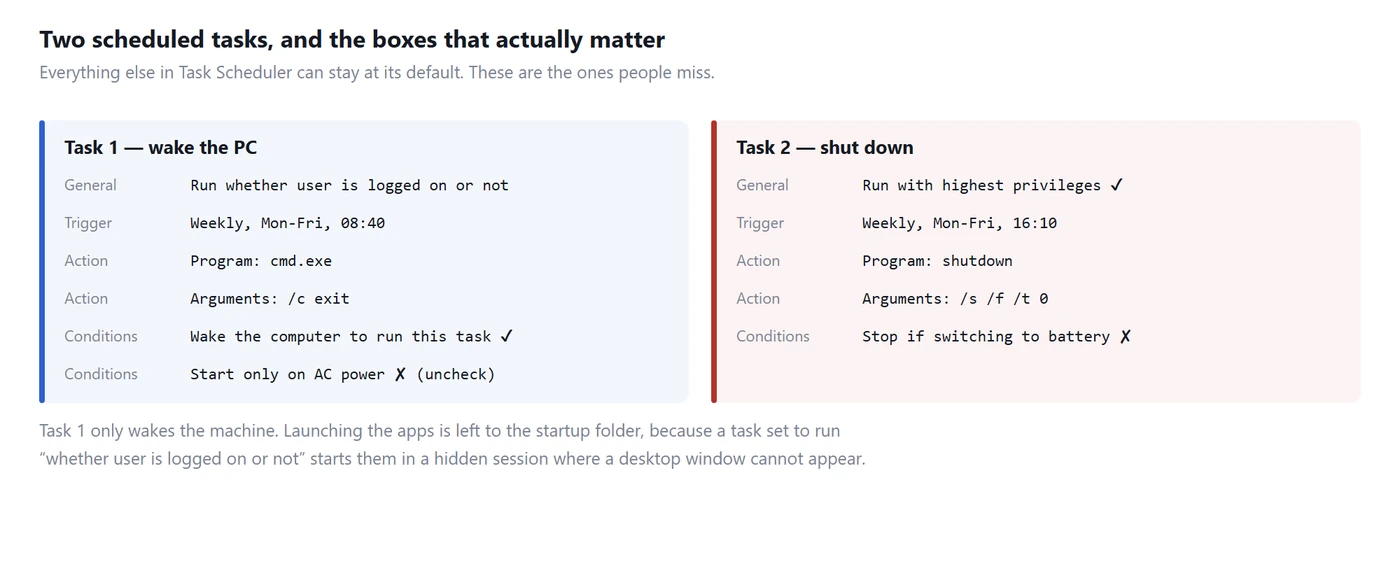
Now the two scheduled tasks.The two Task Scheduler tasks and the specific checkboxes that matter
Open Task Scheduler and choose Create Task, not Create Basic Task — the basic wizard hides the settings you need.
Task one only wakes the machine. Its action is cmd.exe with the arguments /c exit, which does nothing at all. The point is the trigger, weekly on weekdays at 08:40, with Wake the computer to run this task ticked on the Conditions tab. That box is off by default and it is the single most commonly missed setting in this whole guide.
Also on Conditions, untick Start the task only if the computer is on AC power if this is a laptop, or the task will politely decline to run.
Task two shuts the machine down. Trigger it weekly on weekdays at 16:10. Comfortably after your stop time, so positions are closed and the log is written. The action is the program shutdown with the arguments /s /f /t 0. Tick Run with highest privileges on the General tab.
Why not have Task Scheduler launch the app directly? Because a task set to "Run whether user is logged on or not" runs in a hidden session where a desktop window cannot appear. The app would start, fail to show a window, and you would spend an evening working out why. Waking with a task and launching from the startup folder avoids the problem entirely.
Allow wake timers. Two places have a veto. In Windows, go to power plan settings, Change advanced power settings, Sleep, and enable Allow wake timers. In the BIOS or UEFI, look for a setting named something like "Wake on RTC" or "Power on by alarm" and enable it. Laptops often disable wake timers on battery no matter what Windows says.
5. Testing it without waiting a day
Do not find out at 09:30 tomorrow.
Test the batch file by double-clicking it. The gateway should appear, then the app 90 seconds later.
Test the wake by setting task one to five minutes from now, then putting the machine to sleep. It should wake on its own. If it does not, the problem is wake timers, not Task Scheduler.
Test the shutdown by setting task two a few minutes ahead and watching it go down.
Test the app schedule by setting the start time a couple of minutes ahead during market hours and watching the engine start on its own.
Then set the real times and let it run one full day while you are around to watch.
6. Watching it from your phone
Automation is only safe if failure is loud.
TraderWe keeps an outbound connection to our relay, and your phone gets a push notification when the engine starts or stops, a daily loss or profit limit is hit, the broker connection drops, or a position is liquidated.
Machine death is handled differently, because a dead machine cannot report itself. If the connection goes silent and does not come back within 90 seconds, our server sends the alert. The absence of a heartbeat is the signal.
For an automated home PC this matters more than for a rented server, because home machines lose power and internet in ways data centres usually do not. You will not be able to fix it remotely, but you will know within a minute and a half instead of at dinner.
7. Where full automation stops: the broker
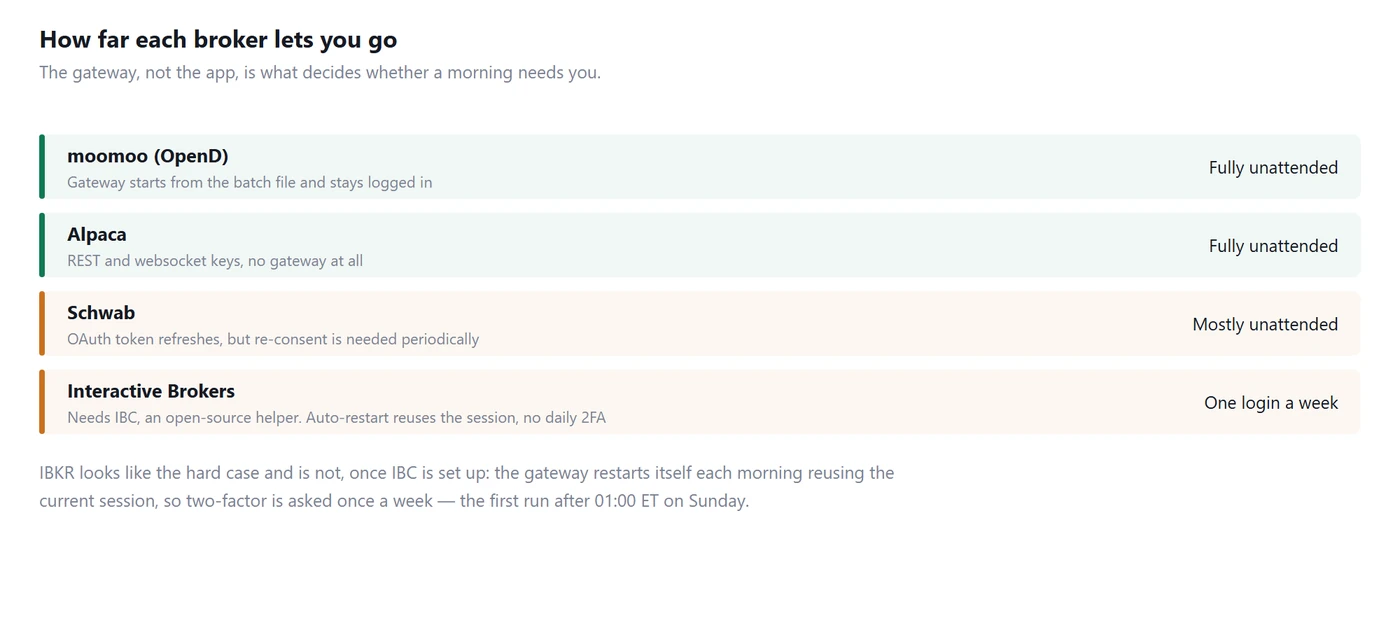
How far each broker can be automated, from fully unattended to one tap per weekday
Everything above works identically for every broker. What differs is the gateway.
moomoo (OpenD) is the friendliest case. The gateway launches from the batch file and stays logged in, so a whole week can pass without you touching the machine. If you want free Level 2 US stock data as well, our moomoo setup guide covers the connection.
Alpaca has no local gateway at all — key-based, over the internet. Nothing to launch, nothing to re-authenticate. See the Alpaca guide.
Schwab uses OAuth. Tokens refresh on their own, but the authorisation has to be renewed periodically, so most weeks are untouched and occasionally one is not. See the Schwab guide.
Interactive Brokers looks like the hard case and is not, once you know the trick. IB Gateway does require two-factor authentication, and if you simply close it and reopen it every morning you will be approving a login on your phone every weekday. That is the setup most people end up with, and it is avoidable.
The key is that restarting is not the same as logging in again. IB Gateway has an auto-restart mechanism that reuses the credentials from the current session, so the restart itself needs no second factor. Authentication is only required the first time the gateway runs after 01:00 ET on Sunday. One login a week, not five.
Getting there in practice means running IBC, a free open-source helper that has been maintained for years. It logs the gateway in, dismisses the dialogs that otherwise sit there waiting for a human, and drives the daily restart. The pieces you will set:
AutoRestartTime in IBC's config.ini sets the daily restart time. Pick something outside market hours and away from your wake-up, such as 05:00.
AutoRestart in the gateway's own Configure, Lock and Exit section is the matching option on the IBKR side.
ReloginAfterSecondFactorAuthenticationTimeout and SecondFactorAuthenticationExitInterval control what happens when a second-factor prompt does appear and nobody answers it. IBC can wait, then retry the login rather than sitting on a dead dialog.
Two requirements that catch people out. You need the offline installer of TWS or Gateway, not the self-updating one, because a program that updates itself will eventually change the dialogs IBC is clicking. And if the gateway crashes mid-week, the session is gone and the next start asks for two-factor again. Which is the correct behaviour, not a bug. IBC's start scripts refuse to launch a second instance against the same config.ini, so a scheduled task that tries to start it every few minutes will quietly do nothing while it is healthy and restart it after a crash.
The security trade-off is real and you should weigh it deliberately. IBC signs in for you, which means your IBKR username and password live in config.ini in plain text. That is a different thing from an API key: it is your account login. The project's own guidance is to keep that file in an encrypted folder, and the settings that used to obfuscate the password were removed rather than improved, so do not expect the file to protect itself. On a home PC in a private room with automatic logon already enabled, this may be a step you are comfortable with. On a shared machine it is not.
So the honest summary for IBKR is: full automation is achievable, it costs you one extra install and a careful decision about where your account password is stored, and you log in once a week on Sunday. See the IBKR setup guide for connecting the app itself.
8. When things go wrong
The PC did not wake. Wake timers are disabled in the power plan or in the BIOS, or the Conditions checkbox is unticked. Check the BIOS last; it is the least likely and the most annoying.
It woke but nothing started. Automatic logon is off, so there is no desktop session. Section 4.
The app started before the gateway was ready. Increase the timeout in the batch file. The app retries for about a minute on its own, so if you were close it may have recovered by itself — check the log before changing anything.
Everything ran but the engine never started. Automatic start is off, or the PC booted after your stop time, or the broker never connected. The app logs which of the three it was.
It shut down with a position open. Your shutdown task is too close to your stop time. Leave at least ten minutes, and make sure "close positions before stopping" is on.
It traded on a day the market was closed. Nothing broke. The engine started, found no data, and did nothing. Harmless, though it does cost you a wake-up and a shutdown on holidays.
9. Is this better than a VPS?
A home PC costs nothing per month and gives you exactly the same architecture. Your keys, your strategies, your broker's own data. If you already have a machine that can sit in a corner, this is the cheaper answer and it is not a compromise.
A VPS is more reliable in the ways that home machines are not: power, internet, and nobody unplugging anything to hoover the room.
The deciding question is not cost, it is what happens when it fails. A home PC that goes down at 10:00 stays down until you are physically there. That is fine for a strategy whose exits fail safe — a hard time exit and a session close-out in every strategy — and not fine for one that needs supervision.
Write those exits either way. They are the reason an unattended setup is safe, and no amount of hardware substitutes for them.
Originally published by TraderWe on August 14, 2026. You may quote and link to this page. Republishing the full text without a link back to the original is not permitted.
I tried something like this once and my PC woke up fine, logged in fine, and then sat there with a Windows update screen while the whole session went by without me. Learned the hard way that the boring part of this setup is the part that actually breaks.
Okay the wake-trade-sleep loop is EXACTLY what I've been trying to hack together for months!! Question though - if the shutdown fires while something is still open, does the app close first or does Windows just yank the plug? That's the bit I want spelled out!!
- separate machine roles (OS vs app) is the useful framing here
- adding: test the wake step on a weekend first
- also checking my BIOS actually supports wake timers before anything else
funny reading this as the guy who's awake when the PC would be doing all this by itself lol. crypto never closes so the shutdown half doesn't really apply to me, but the auto-login and relaunch part I'm stealing for when I finally do sleep at normal hours.